Allureluoli 二月FEBRUARY

区块链国赛笔记 14|流程模拟:四节点建链与 WeBASE 部署

按模拟任务把建链、端口调整和 WeBASE 部署串成一次完整练习,保留命令输出和截图作为操作记录。

本文由个人备赛旧笔记整理,整理日期为 2026-11-03。命令、输出和测试记录属于当时的实验环境;本文未重新搭建整套环境验证。

阅读前先确认

题面中的三个起始端口与记录中实际使用的两个端口参数存在版本差异。这份记录不能证明所有题面要求已完成,复现时应逐项核对节点配置与监听端口。

第一部分 1-2题

第一题

【要求】

登录Linux服务器,完成节点部署、启动、将过程结果截图,保存至作答 区并点击提交。

1.任务

登陆Linux服务器,进入指定操作目录(/root/tools/)基于开发部署工 具build_chain.sh 脚本在本地搭建一条4 节点的FISCO BCOS链。起始端口 号为:30300,20200,8545。将节点2的端口号改为30500,20400,8675。确保 搭建的区块链系统能正常运行,并将执行的命令和完整的命令执行结果截图保存 至作答区并点击提交。具体任务如下

作答:

  • 创建节点
1
2
3
4
5
6
7
8
9
10
11
12
13
14
15
16
17
18
19
20
21
22
└─$ bash build_chain.sh -l 127.0.0.1:4 -p 30300,20200 -e ./fisco-bcos
[INFO] Use binary ./fisco-bcos-linux-x86_64.tar.gz
[INFO] Generate ca cert successfully!
Processing IP 127.0.0.1 Total:4
[INFO] Generate ./nodes/127.0.0.1/sdk cert successful!
[INFO] Generate ./nodes/127.0.0.1/node0/conf cert successful!
[INFO] Generate ./nodes/127.0.0.1/node1/conf cert successful!
[INFO] Generate ./nodes/127.0.0.1/node2/conf cert successful!
[INFO] Generate ./nodes/127.0.0.1/node3/conf cert successful!
[INFO] Admin account: 0x3e92f42f138364a66c04e636a1eee5aca03f352f
==============================================================
[INFO] GroupID : group0
[INFO] ChainID : chain0
[INFO] fisco-bcos path : ./fisco-bcos-linux-x86_64.tar.gz
[INFO] Auth mode : false
[INFO] Start port : 30300 20200
[INFO] Server IP : 127.0.0.1:4
[INFO] SM model : false
[INFO] enable HSM : false
[INFO] nodes.json : 127.0.0.1:30300,127.0.0.1:30301,127.0.0.1:30302,127.0.0.1:30303,
[INFO] Output dir : ./nodes
[INFO] All completed. Files in ./nodes
1
2
3
4
5
6
7
8
9
10
┌──(cure㉿LAPTOP-CMAM5D0J)-[~/fisco]
└─$ cd nodes

┌──(cure㉿LAPTOP-CMAM5D0J)-[~/fisco/nodes]
└─$ ls
127.0.0.1 ca

┌──(cure㉿LAPTOP-CMAM5D0J)-[~/fisco/nodes]
└─$ cd 127.0.0.1/node2

  • 修改节点2的端口号
1
2
3
┌──(cure㉿LAPTOP-CMAM5D0J)-[~/fisco/nodes/127.0.0.1/node2]
└─$ vim config.ini
// 修改 [p2p], [rpc],[web3_rpc] 三项的listen_port 即可
  • 启动节点
1
2
3
4
5
6
7
8
9
10
┌──(cure㉿LAPTOP-CMAM5D0J)-[~/fisco/nodes/127.0.0.1]
└─$ bash start_all.sh
try to start node0
try to start node1
try to start node2
try to start node3
node1 start successfully pid=2722
node0 start successfully pid=2735
node3 start successfully pid=2733
node2 start successful
  • 检查节点进程
1
2
3
4
5
6
7
┌──(cure㉿LAPTOP-CMAM5D0J)-[~/webase-deploy]
└─$ ps -ef | grep fisco
cure 744 26480 0 18:56 pts/8 00:00:00 grep --color=auto fisco
cure 2722 26479 4 17:23 pts/8 00:04:31 /home/cure/fisco/nodes/127.0.0.1/node1/../fisco-bcos -c config.ini -g config.genesis
cure 2733 26479 4 17:23 pts/8 00:04:30 /home/cure/fisco/nodes/127.0.0.1/node3/../fisco-bcos -c config.ini -g config.genesis
cure 2735 26479 5 17:23 pts/8 00:04:40 /home/cure/fisco/nodes/127.0.0.1/node0/../fisco-bcos -c config.ini -g config.genesis
cure 2737 26479 4 17:23 pts/8 00:04:28 /home/cure/fisco/nodes/127.0.0.1/node2/../fisco-bcos -c config.ini -g config.genesis

第二题

【要求】 登录Linux服务器,部署节点管理平台,并将部署、启动、应用过程结果截图,保存至作答区并点击提交。

【任务】

登录linux服务器,进入指定操作目录(/root/tools/webase)中完成区块 链一体化管理平台的配置部署,并检查是否安装成功,具体操作任务如下:

  1. 进入WeBASE-Node-Manager目录,完成数据库初始化操作;

  2. 修改application.yml 配置文件,进行WeBASE-Node-Manager的服务配置,包括数据库名称,数据库用户,数据库密码等;

  3. 使用命令启动WeBASE-Node-Manager管理平台服务,并检查节点管理是否正常启动;

  4. 使用swagger对节点管理服务的 API 接口测试

作答

1
2
3
4
5
6
7
8
9
10
11
12
13
14
15
Enter password: *****************
Welcome to the MySQL monitor. Commands end with ; or \g.
Your MySQL connection id is 8
Server version: 8.0.40 MySQL Community Server - GPL

Copyright (c) 2000, 2024, Oracle and/or its affiliates.

Oracle is a registered trademark of Oracle Corporation and/or its
affiliates. Other names may be trademarks of their respective
owners.

Type 'help;' or '\h' for help. Type '\c' to clear the current input statement.

mysql>

总之先进去

look一下官方文档的 “初始化数据库”

摘自官方文档:


5.1 新建数据库

1
2
3
4
#登录MySQL:
mysql -u ${your_db_account} -p${your_db_password} 例如:mysql -u root -p123456
#新建数据库:
CREATE DATABASE IF NOT EXISTS {your_db_name} DEFAULT CHARSET utf8 COLLATE utf8_general_ci;

5.2 修改脚本配置

进入数据库脚本目录

1
cd  dist/script

修改数据库连接信息:

1
2
3
修改数据库名称:sed -i "s/webasenodemanager/${your_db_name}/g" webase.sh
修改数据库用户名:sed -i "s/defaultAccount/${your_db_account}/g" webase.sh
修改数据库密码:sed -i "s/defaultPassword/${your_db_password}/g" webase.sh

例如:将数据库用户名修改为root,则执行:

1
sed -i "s/defaultAccount/root/g" webase.sh

5.3 运行数据库脚本

执行命令:bash webase.sh ${dbIP} ${dbPort} 如:

1
bash webase.sh 127.0.0.1 3306

继续,就创建webasenodemanager吧

1
2
mysql> CREATE DATABASE IF NOT EXISTS webasenodemanager DEFAULT CHARSET utf8 COLLATE utf8_general_ci;
Query OK, 1

进入脚本目录

1
2
3
4
5
6
7
┌──(cure㉿LAPTOP-CMAM5D0J)-[~/webase-deploy/webase-node-mgr]
└─$ cd script

┌──(cure㉿LAPTOP-CMAM5D0J)-[~/webase-deploy/webase-node-mgr/script]
└─$ ls
temp.sh webase-ddl.sql webase-dml.sql webase.sh webase-sql.list

那很有生活了

他的sed -i 命令太过时了 直接 vim进去改呗

1
2
3
4
5
6
7
8
#dbUser
DBUSER="root"
5.2 修改脚本
#abPass
PASSWD="?????"
进入数据库脚本
#dbName
DBNAME="webasenodemanager"

我们直接运行脚本即可

1
2
3
4
5
┌──(cure㉿LAPTOP-CMAM5D0J)-[~/webase-deploy/webase-node-mgr/script]
└─$ bash webase.sh 192.168.15.182 3306

init start....
init success...

然后去改 application.yml

1
2
┌──(cure㉿LAPTOP-CMAM5D0J)-[~/webase-deploy/webase-node-mgr/conf]
└─$ vim application.yml

改spring 的datasource 中的url以及username和password即可

然后去启动

1
2
3
4
5
6
7
8
9
10
11
12
13
14
┌──(cure㉿LAPTOP-CMAM5D0J)-[~/webase-deploy/webase-node-mgr]
└─$ bash start.sh
===============================================================================================
Server com.webank.webase.node.mgr.Application Port 5001 ...PID(22942) [Starting]. Please message check through the log file (default path:./log/).
===============================================================================================

┌──(cure㉿LAPTOP-CMAM5D0J)-[~/webase-deploy/webase-node-mgr]
└─$ ls
apps conf gradle lib log release_note.txt script start.sh status.sh stop.sh

┌──(cure㉿LAPTOP-CMAM5D0J)-[~/webase-deploy/webase-node-mgr]
└─$ cd log


看下日志有没有启动成功

1
2
3
4
5
6
7
8
9
10
11
12
13
14
15
16
17
18
19
20
21
22
23
24
25
26
┌──(cure㉿LAPTOP-CMAM5D0J)-[~/webase-deploy/webase-node-mgr/log]
└─$ ls
node-manager.out WeBASE-Node-Manager.log
WeBASE-Node-Manager-error.log WeBASE-Node-Manager.log.2025-09-11.1.log.gz
WeBASE-Node-Manager-error.log.2025-09-11.1.log.gz WeBASE-Node-Manager.log.2025-09-12.1.log.gz
WeBASE-Node-Manager-error.log.2025-09-12.1.log.gz WeBASE-Node-Manager.log.2025-09-13.1.log.gz
WeBASE-Node-Manager-error.log.2025-09-13.1.log.gz WeBASE-Node-Manager.log.2025-09-14.1.log.gz
WeBASE-Node-Manager-error.log.2025-09-14.1.log.gz WeBASE-Node-Manager.log.2025-09-15.1.log.gz
WeBASE-Node-Manager-error.log.2025-09-15.1.log.gz WeBASE-Node-Manager.log.2025-09-16.1.log.gz
WeBASE-Node-Manager-error.log.2025-09-16.1.log.gz WeBASE-Node-Manager.log.2025-09-17.1.log.gz
WeBASE-Node-Manager-error.log.2025-09-17.1.log.gz WeBASE-Node-Manager.log.2025-09-18.1.log.gz

┌──(cure㉿LAPTOP-CMAM5D0J)-[~/webase-deploy/webase-node-mgr/log]
└─$ tail -f WeBASE-Node-Manager.log
2025-09-26 19:28:50.570 [node-mgr-task-6] INFO CertMonitorTask() - end checkCertValidityForAlert useTime:276
2025-09-26 19:28:50.570 [node-mgr-task-3] WARN NodeStatusMonitorTask() - checkNodeStatusForAlert jump over: not found any group
2025-09-26 19:28:50.575 [node-mgr-task-4] INFO ChainService() - Run task:[DeployType:0, isChainRunning:false]
2025-09-26 19:28:50.575 [node-mgr-task-4] INFO GroupService() - start resetGroupList. startTime:1758886130575
2025-09-26 19:28:50.578 [node-mgr-task-4] INFO GroupService() - resetGroupList frontList empty, jump over
2025-09-26 19:29:00.000 [node-mgr-task-9] INFO DeleteInfoTask() - start deleteInfoStart. startTime:1758886140000
2025-09-26 19:29:00.006 [node-mgr-task-9] WARN DeleteInfoTask() - DeleteInfoTask jump over, not found any group
2025-09-26 19:29:00.009 [node-mgr-task-7] WARN StatisticsTransdailyTask() - updateTransdailyData jump over: no group information exists
2025-09-26 19:29:00.293 [node-mgr-task-1] WARN TransMonitorTask() - blockStat jump over, not found any group
2025-09-26 19:29:10.294 [node-mgr-task-8] WARN TransMonitorTask() - blockStat jump over, not found any group
2025-09-26 19:29:15.001 [node-mgr-task-10] INFO DeleteInfoTask() - start deleteInfoStart. startTime:1758886155001
2025-09-26 19:29:15.005 [nod

看样子是成功了

然后去启动一下WebaseWeb和WebaseFront啥的

题目要求我们检查它正常启动

正常启动的三个证据

  • 状态
1
2
3
4
5
6
┌──(cure㉿LAPTOP-CMAM5D0J)-[~/webase-deploy/webase-node-mgr]
└─$ bash status.sh
===============================================================================================
Server com.webank.webase.node.mgr.Application Port 5001 is running PID(24663)
===============================================================================================

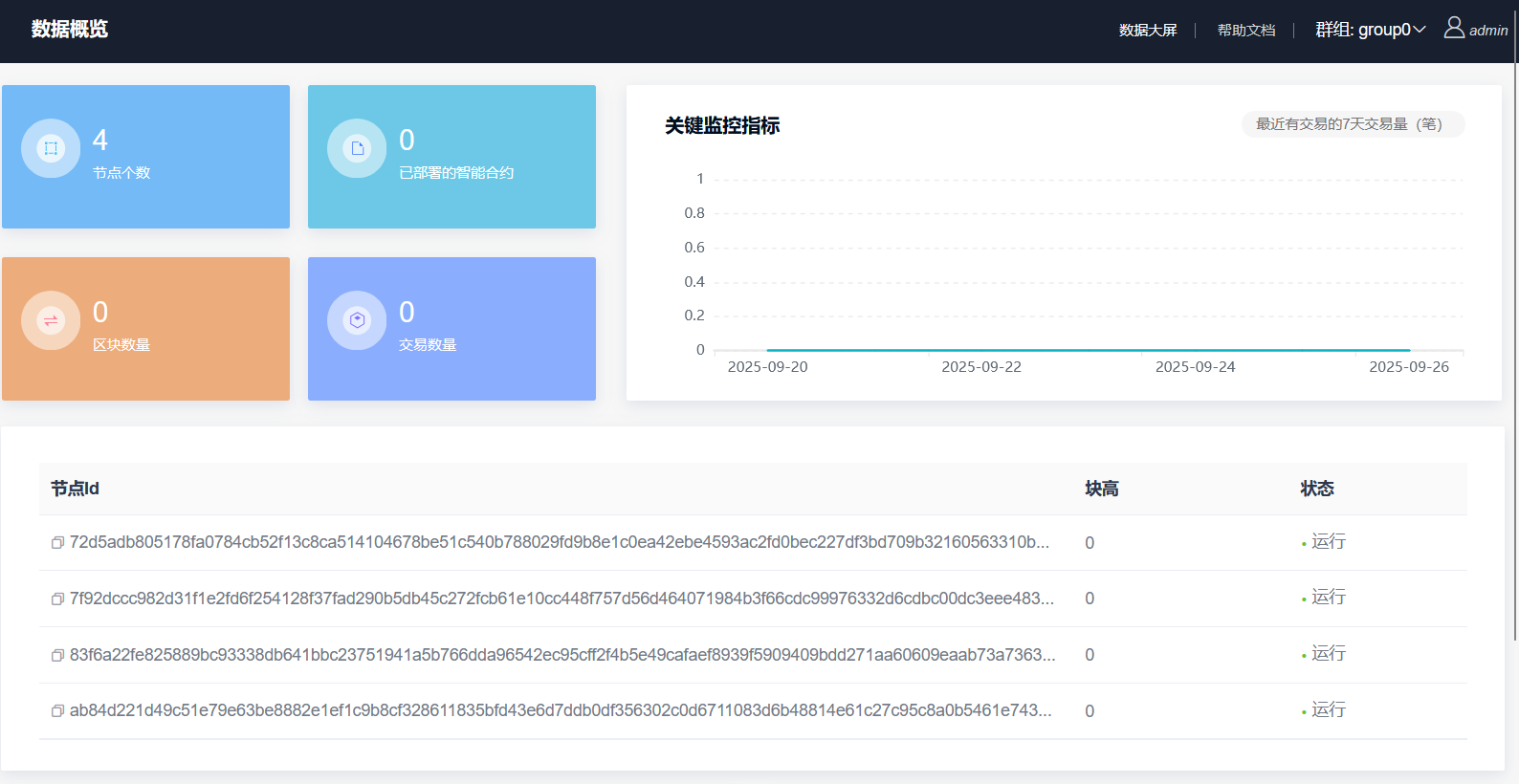
  • 证据2 因为webaseWEB需要 使用WeBASE-Node-Manager

    c0e755d9d4406df41d4d7b12064fd63a

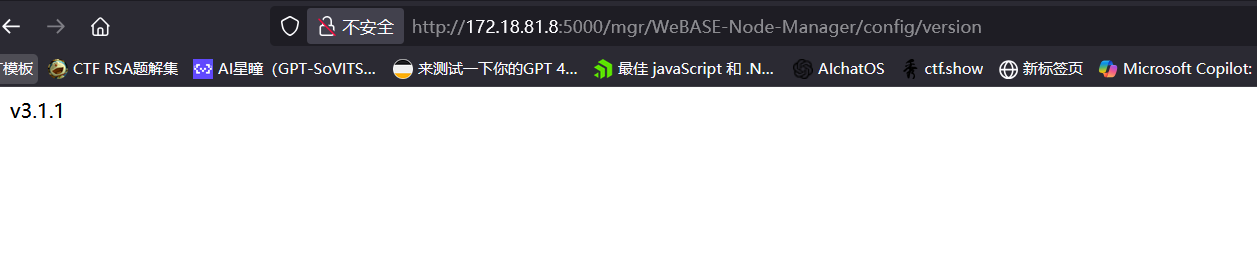
  • 证据3 访问接口get 版本

    474dc3cd7a0c558b055231f4317c94be

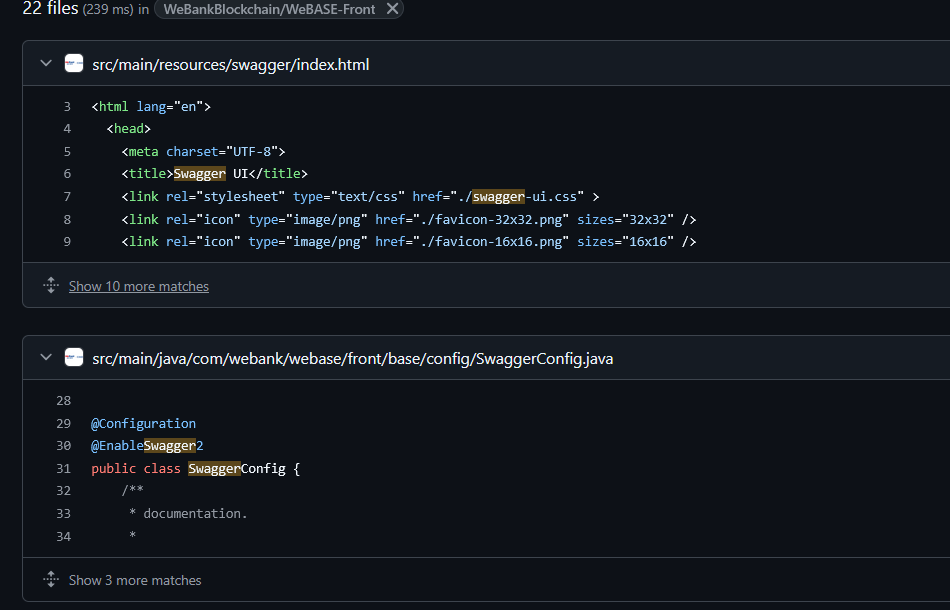
然后 swagger-ui这玩意官方文档里根本没说,问题不大,我去翻源码了

4462425c0087659fae05ce0d75396c57

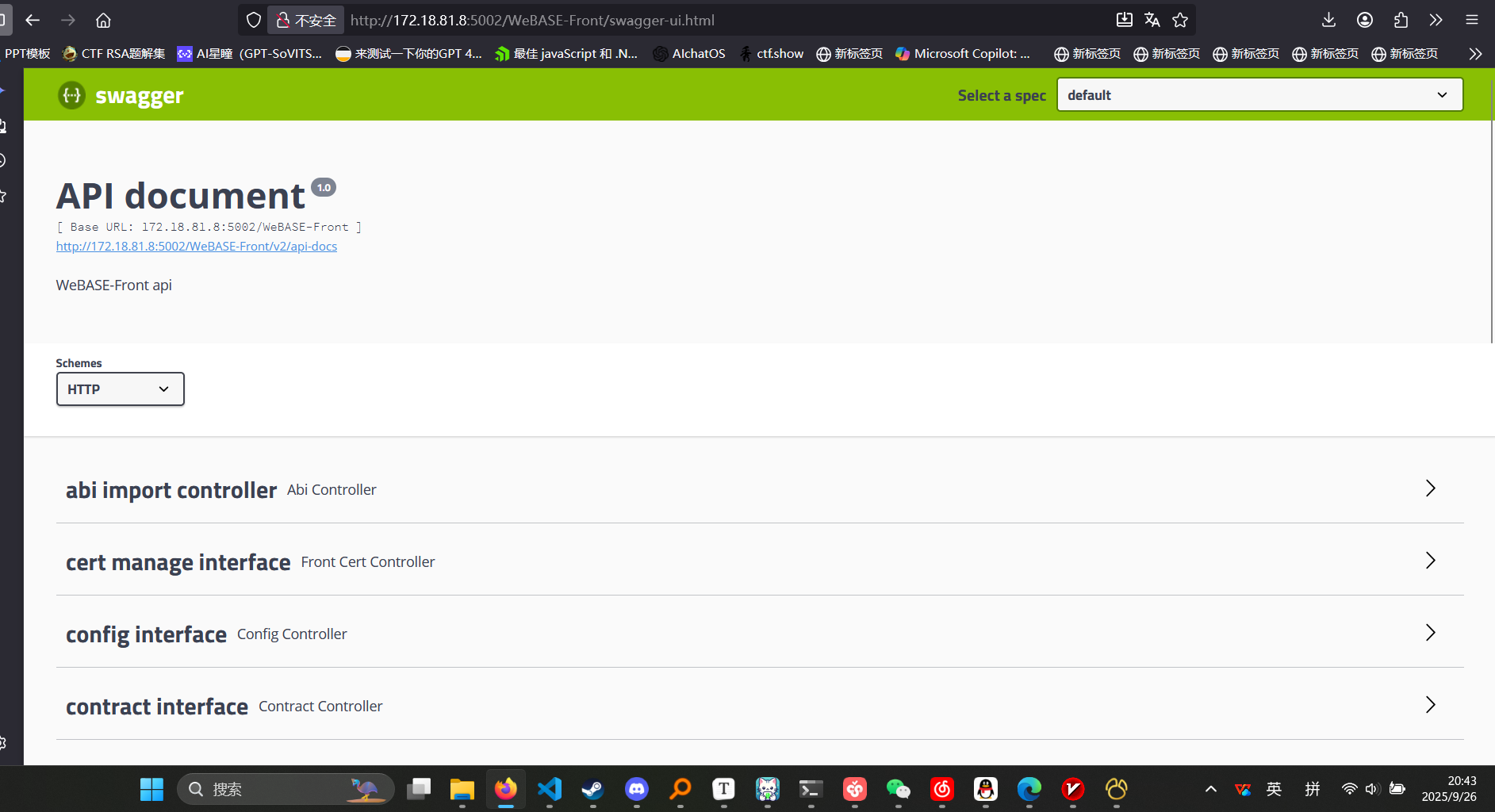
找到了正确的界面

f5b025181855f793be8c063ecbcd7bc6

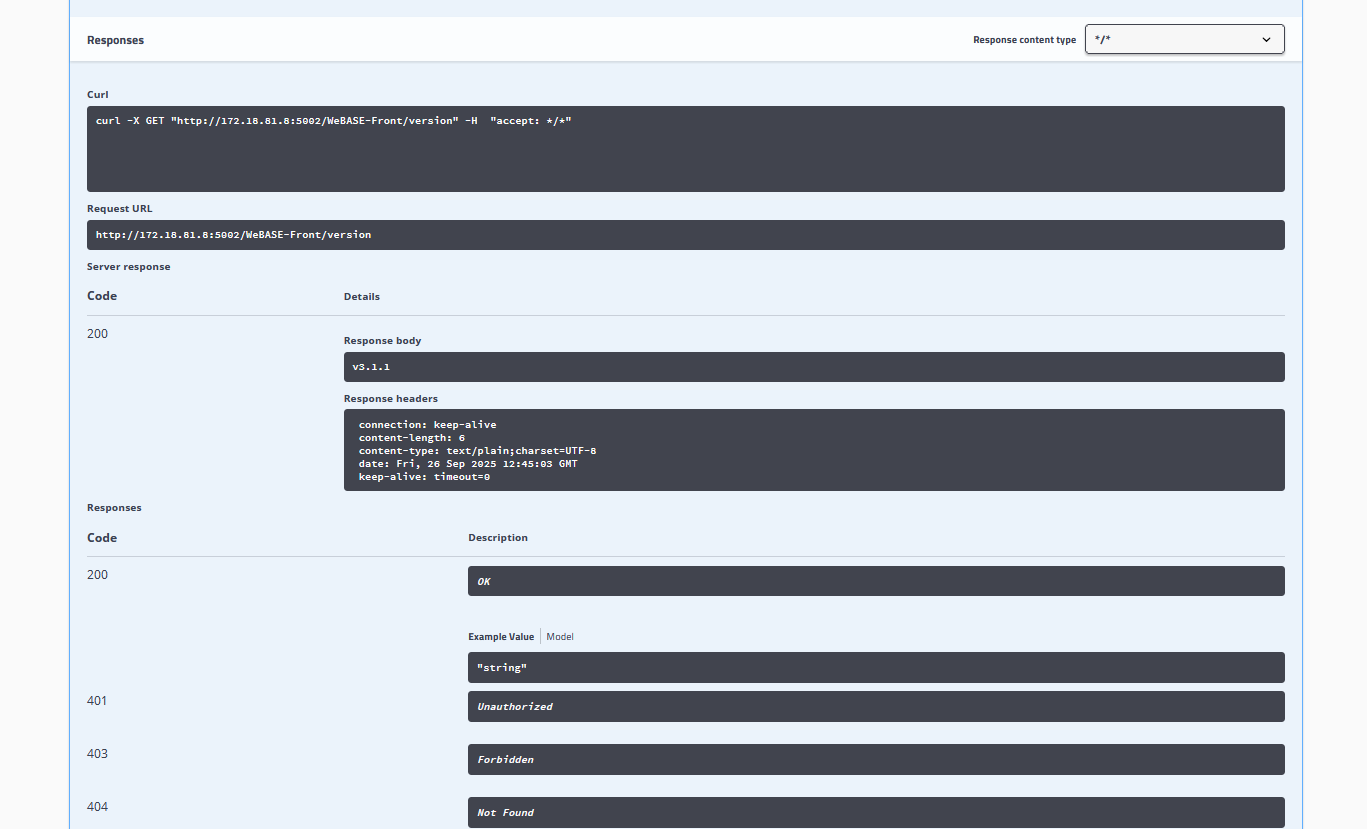
随便执行个简单的

0200afd40794b96e8f9d36eeb2797695

复现时的自查

  • 记录自己实际使用的版本、配置和缺失依赖。
  • 对照本篇关键步骤,保存命令或调用结果,并解释结果代表什么。
  • 对失败或与原记录不一致的情况保留错误信息,不把历史输出当成自己的验证结果。

返回系列导读 · 上一篇 · 下一篇

评论COMMENTS